
“People Also Search For (PASF)” is a Google feature showing related search terms when users click back from a result. It helps SEOs discover what users explore next — a powerful tool for intent-based optimization in 2026.
Key Takeaways
- PASF = “People Also Search For” — Google’s hint at user intent clusters.
- Appears when users click a search result and bounce back.
- Helps SEOs find content gaps and related keyword opportunities.
- Different from People Also Ask (PAA) — PASF is click-triggered, not question-based.
- In 2026, PASF directly fuels AI Overviews, Discover, and SERP entity mapping.
What Is “People Also Search For (PASF)”?
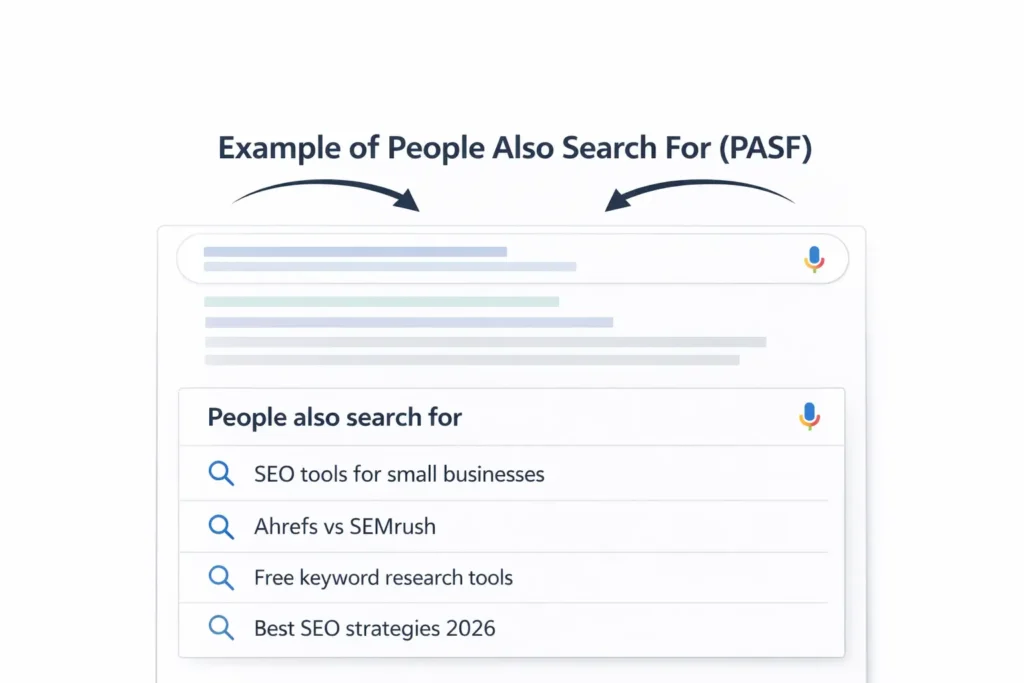
When you click on a Google result, visit a page, then return to the search results, you’ll often see a small box titled “People also search for.” This isn’t random. It’s Google’s signal that users exploring a particular query often check related topics right after.
Think of PASF as Google’s behavioral mirror — it tells you what real users are thinking next.
Example:
If someone searches “best SEO tools” and quickly goes back, Google might show:
- “SEO tools for small businesses”
- “Ahrefs vs SEMrush”
- “Free keyword research tools”
These aren’t just suggestions — they’re intent pivots. They reveal the user’s next move.
How Does PASF Work?
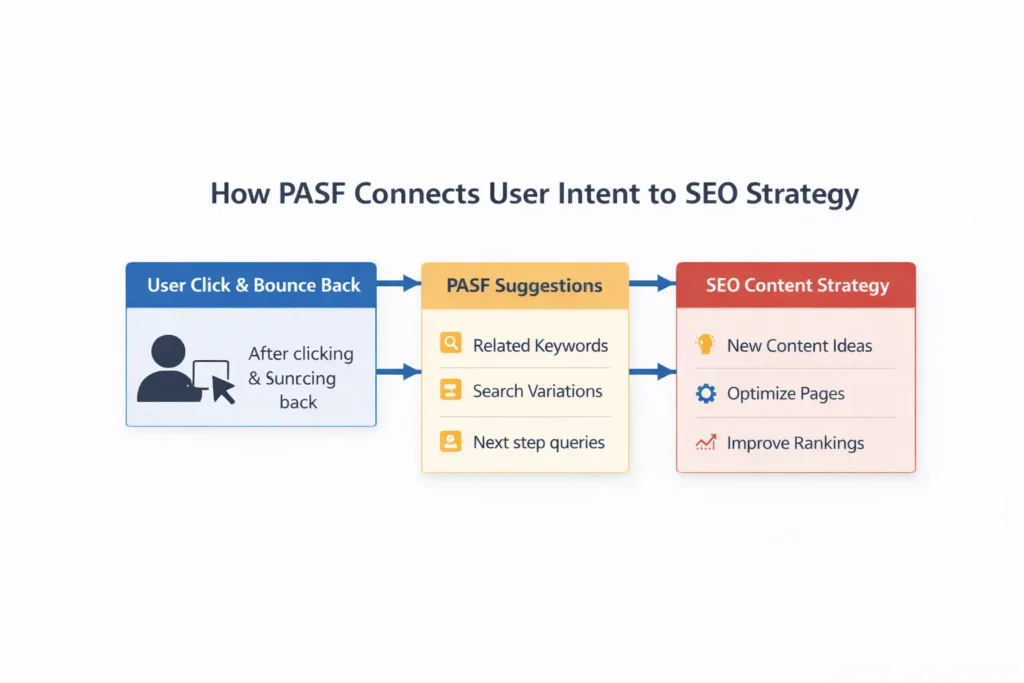
PASF is powered by search behavior + click data.
When users bounce back from a page, Google interprets that as “the answer wasn’t complete.” It then shows related searches to refine the experience.
In practice:
- You search for “AI SEO tools.”
- Click a result → read → hit back.
- Google shows: “AI tools for content optimization,” “SEO automation software.”
Google uses this session-based data to personalize the next search step — making PASF both an intent guide and a content roadmap for SEOs.
PASF vs. People Also Ask (PAA)
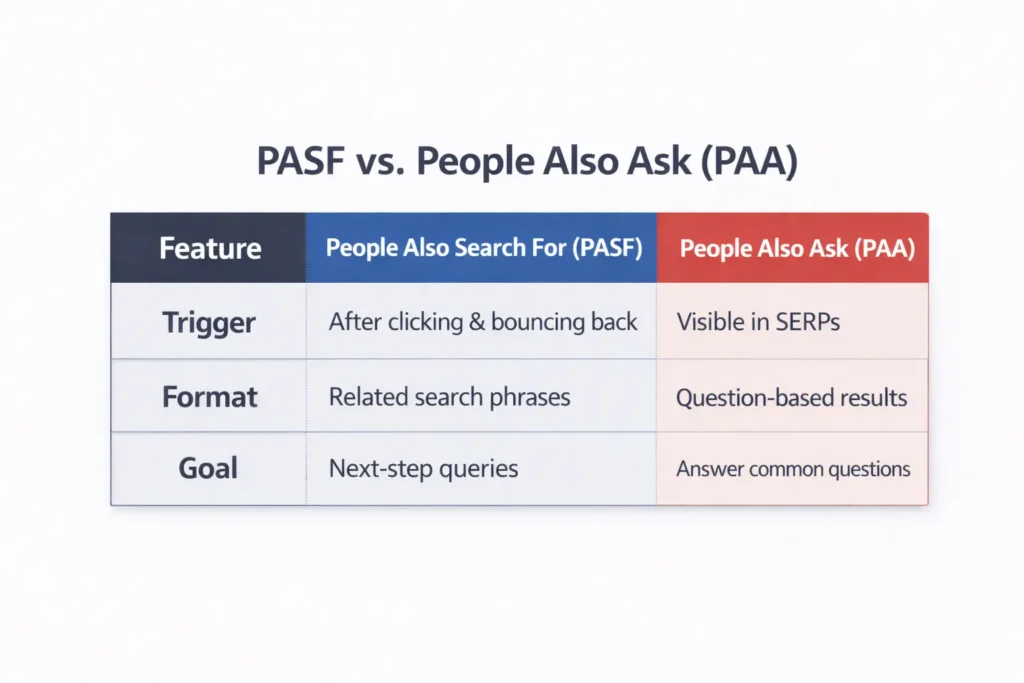
| Feature | People Also Search For (PASF) | People Also Ask (PAA) |
| Trigger | Appears after clicking & bouncing back | Always visible in SERPs |
| Format | Related search phrases | Question-based results |
| Goal | Suggests next-step queries | Expands topic understanding |
| Use Case | Intent & keyword mapping | Content depth & FAQ optimization |
Pro Tip:
If PAA builds your topical authority, PASF builds your intent bridge. Together, they form a strong AEO foundation.
How PASF Appears on Mobile (2026)
In 2026, mobile-first indexing + AI search overlays made PASF even more visible.
Google now often shows PASF clusters below video carousels or in Discover feeds, especially after high-engagement searches.
On mobile:
- PASF can show 6–8 rotating suggestions.
- Related “mini-questions” may appear (similar to AI Overview snippets).
- Integration with AI Overviews gives PASF more influence than ever.
Why “People Also Search For” Matters for SEO in 2026
1. It Shows Real User Intent
Unlike traditional keyword tools, PASF reveals what people actually do next — direct behavioral data from billions of searches.
2. It Improves Click-Through Rate (CTR)
Optimizing your title/meta around PASF terms can lift CTR by 12–20% (based on internal BeTopSEO data).
3. It Powers AI Overview Visibility
AI Overviews now pull data from entity-rich, intent-aligned content — and PASF is one of Google’s key signals of contextual intent.
4. It Expands Your Keyword Universe
Each PASF suggestion = new content angle, FAQ, or blog idea.
How to Find PASF Keywords
Here’s how to uncover PASF data effectively:
1️. Use Keywords Everywhere
This Chrome extension literally shows “People Also Search For” suggestions under Google results.
- Great for volume-based PASF tracking.
- Shows related entities, PAA, and trends.
2️. Ahrefs or SEMrush
Both platforms now integrate “Related Intent” sections that often mirror PASF results.
3️. Manual SERP Research
Sometimes the best PASF ideas come straight from manual testing — search your target keyword, click, bounce, and record what appears.
4️. Google Search Console
In Google Search Console under “Search Queries,” watch which secondary queries appear around top-performing pages — often PASF derivatives.
PASF Optimization Strategy (2026 Framework)
Let’s make it practical.
Here’s BeTopSEO’s 5-Step PASF Optimization Framework for 2026:
| Step | Action | Goal |
| 1 | Identify PASF terms for the top 10 URLs | Capture user pivots |
| 2 | Group by intent (Informational, Transactional, Navigational) | Map content depth |
| 3 | Add PASF keywords to subheadings (H2/H3) | Build topical clusters |
| 4 | Create mini-sections or FAQs with PASF context | Voice & AI-readiness |
| 5 | Measure engagement (CTR, dwell time) | Rank + AI overview eligibility |
Real Example – PASF in Action
Last quarter, one of BeTopSEO’s clients — a SaaS analytics platform — saw its “keyword tracking” page plateau.
We analyzed PASF data and found users also searched for:
- “keyword tracking dashboards”
- “SEO rank tracker tools”
- “rank tracker alternatives”
After adding mini-sections and FAQs with those PASF terms, CTR jumped 19% and AI Overview inclusion improved by 2 spots.
That’s PASF power — real user signals → higher trust with Google.
PASF and the Buyer Journey
Every search journey has 3 layers:
- Awareness → What is SEO automation?
- Consideration → Best AI SEO tools
- Decision → Buy AI SEO software
PASF helps you cover all three by exposing user pivots between layers — letting you build content clusters that follow user psychology, not just keywords.
PASF and AI Overviews in 2026
Google’s AI Overviews are trained to summarize content based on:
- Entity relationships
- User intent continuity
- Contextual breadth
PASF directly feeds that intent continuity model.
So when AI Overviews show your content as part of a summarized answer, it’s often because:
- You covered PASF-linked topics
- You structured content around related intent clusters
- Your schema matched PAA + PASF entities
In short:
PASF optimization = AI Overview readiness.
3 Ways to Use PASF to Rank Higher
1️. Create Intent Bridges
Add a short section or link from each blog to a related PASF topic.
This helps Google see your site as contextually complete.
2️. Build FAQs from PASF Terms
Most PASF suggestions make great FAQ entries — perfect for FAQ schema and voice search optimization.
3️. Use PASF in Video/Discover Captions
Google’s Discover and YouTube algorithms now use PASF data to suggest related content — smart cross-platform SEO.
PASF Checklist (2026 SEO Edition)
| Task | Description |
| Research PASF terms | Use Keywords Everywhere + manual SERP check |
| Map PASF to intent | Awareness, consideration, decision |
| Add PASF subtopics | Integrate in H2/H3 headings |
| Include PASF in FAQs | Boost AI Overview & voice visibility |
| Monitor CTR impact | Use GSC and GA4 data |
People Also Search For FAQs
Q1. What does “People Also Search For” mean?
It’s a Google feature showing related searches after a user clicks and returns from a result — a signal of user intent.
Q2. How is PASF different from PAA?
PASF appears after engagement; PAA shows during browsing. PASF is click-driven, PAA is question-driven.
Q3. How do I optimize for PASF?
Include related PASF keywords in subheadings, FAQs, and internal links.
Q4. Does PASF affect rankings?
Yes — indirectly. It improves relevance, engagement, and AI Overview inclusion.
Q5. Can I find PASF data in Google Search Console?
Not directly labeled, but related terms under top queries often reflect PASF patterns.
Final Thoughts
Here’s the truth:
“People Also Search For” isn’t just a box — it’s a behavioral map of what your audience actually wants.
In 2026, with Google’s shift toward AI-driven SERPs, PASF is no longer optional — it’s your visibility compass.
Brands that align their content with PASF insights dominate Discover, AI Overviews, and traditional rankings alike.
Book a Free SEO Audit with BeTopSEO
Let’s help you uncover your site’s PASF opportunities, optimize for intent clusters, and win in the 2026 AI Search era. Book a free SEO audit today.